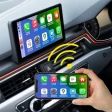
The MirrorLink Car Display app offers a seamless solution for integrating your smartphone with your vehicle's infotainment system. This innovative technology allows you to access a wide range of apps directly on your car's display, transforming your driving experience. Imagine having your navigation, music, and messaging capabilities all within reach of your steering wheel. MirrorLink creates a harmonious partnership between your phone and car, making it feel as if they've fallen head over heels for each other. Setting up MirrorLink is a breeze, requiring only a compatible smartphone and a car that supports the technology. With a simple plug-in, your phone's screen is mirrored onto your car's display, providing an intuitive interface that ensures you can navigate without distractions while driving. Whether you're navigating through bustling city streets or cruising down open highways, MirrorLink's integration with apps like Google Maps and Waze ensures you'll never miss a turn. Moreover, you can control your favorite playlists without reaching for your phone, transforming your car into a mobile concert hall. MirrorLink's design prioritizes safety, offering voice control options and steering wheel integration to minimize distractions. You can take calls, send messages, or even dictate notes without taking your hands off the wheel, allowing you to stay connected while keeping your focus on the road. While MirrorLink is primarily available for Android devices and not all car models support the technology, the benefits it offers for compatible users are substantial. By merging your smartphone with your car's infotainment system, MirrorLink simplifies your tech-laden life and provides a smoother, safer, and more connected driving experience.
Like any app, Mirror Link Car Display has its pros and cons. Here are some of the main ones:
Pros:- Seamless phone mirroring
- User-friendly interface
- Supports multiple apps
- Voice control integration
- Enhances driving experience
- Limited compatibility
- May drain phone battery
- Requires stable internet
- Subscription fees
- Potential data privacy issues